🧠 Day 4: Routes, Ports, Protocols & Switchcraft – Diving Deeper into Networking

I have a strong and evolving interest in cybersecurity and ethical hacking, proven by my top 1% rank on TryHackMe, completion of SOC Fundamentals, multiple Udemy courses, and active participation in CTF programs and practical hacking series. Currently, I work as a Cybersecurity Associate at Sattrix Information Security, where I serve as an ArcSight Administrator and have hands-on experience with SIEM tools like Splunk and NewEvol.
Alongside cybersecurity, I also have a background in web development with experience in HTML, CSS, JavaScript, and Python scripting. I’m deeply committed to continuous learning and real-world application, with a consistent track record of completing certifications and challenges. Despite ongoing health challenges that impact productivity, I remain focused on deepening my expertise and building a successful career in cybersecurity and ethical hacking.
Welcome back, tech enthusiasts! 🚀
Day 4 of my networking expedition took me deep into the heart of what makes our digital world run smoothly: routing, well-known ports, protocols, and some serious switch magic like VLANs, STP, and Port Mirroring.
Let’s break it down in a way that feels like you’re sipping chai while debugging a router (relatable, right?). ☕🛠️
🧭 Routes: Your Network's GPS
Imagine sending a letter – it needs a path to get to its destination. That’s exactly what routing does in networking: it defines the way data packets travel from source to destination.
🛣️ Types of Routing
📌 Static Routing
Manually configured, straightforward.
Best for small networks or when you want full control.
Cisco Example:
Router(config)# ip route 192.168.2.0 255.255.255.0 192.168.1.1
📌 Default Routing
Like telling your network, “If you don’t know where to go, ask this guy.”
Uses
0.0.0.0 0.0.0.0as a catch-all.
🤖 Dynamic Routing
Think of it like GPS that updates based on traffic.
Routers exchange info to find the best path automatically.
Used in larger, constantly changing networks.
🔌 Well-Known Ports: Digital Doorways
Ports are like doors in your system’s building—some are wide open, some locked, and some only open to specific people.
| Port | Service | Protocol |
| 22 | SSH – Secure Remote Access | TCP |
| 80 | HTTP – Web Traffic | TCP |
| 443 | HTTPS – Secure Web | TCP |
| 53 | DNS – Internet Name Lookup | TCP/UDP |
| 25 | SMTP – Sending Emails | TCP |
| 110 | POP3 – Retrieving Emails | TCP |
| 161 | SNMP – Monitoring Devices | UDP |
| 3389 | RDP – Remote Desktop | TCP |
These are just a few. Knowing them is vital for firewalls, pentesting, or troubleshooting.
🔄 TCP vs UDP: The Reliability Showdown
| Feature | TCP | UDP |
| Connection | Reliable (Handshake) | No connection |
| Speed | Slower | Faster |
| Error Handling | Yes | Minimal |
| Use Cases | Web, Email, File Transfer | Streaming, VoIP, Gaming |
In short:
TCP = “Let’s talk properly.” 📞
UDP = “YOLO, just send it.” 🚀
🕵️♂️ Packet Analyzer – Like X-ray Vision for Networks
Tools like Wireshark let you peek inside network packets.
You can:
See who’s talking to whom.
Check what protocols are in use.
Spot suspicious or faulty traffic.
It’s essential for security pros and curious nerds alike.
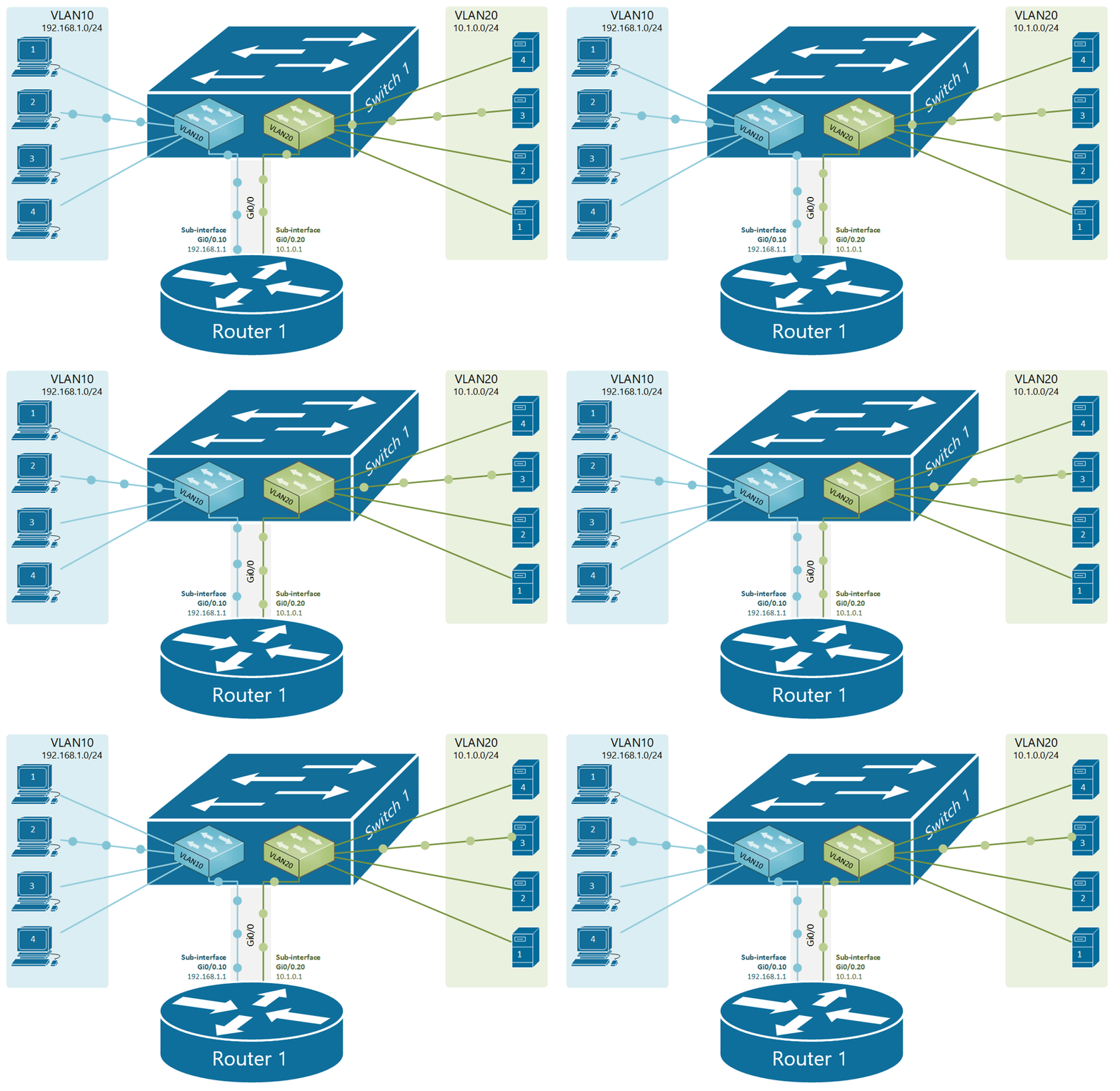
🧩 VLANs – Virtual Party Rooms
A VLAN (Virtual Local Area Network) lets you segment your physical network into logical groups.
Devices can behave like they’re on the same network, even if they’re not.
Reduces broadcast traffic.
Helps in organizing departments (HR, Finance, etc.).
🧱 Think of it like giving each team their own invisible room in the same office.
🌉 Trunking VLANs – One Cable, Many Channels
Trunking allows multiple VLANs to share a single network connection.
Uses 802.1Q tags to mark VLAN info on packets.
If a packet has no tag, it goes to the Native VLAN.
Efficient, elegant, and neat.
🌲 STP – Saving Networks from Loops
Spanning Tree Protocol prevents your switches from creating loop nightmares.
Here's how it works:
🏆 Root Bridge Election – Lowest Bridge ID wins.
🛣️ Path Cost Calculation – Lower is better.
🎯 Port Roles – Root, Designated, or Blocked.
🔁 State Transitions – Ports go from Blocking → Listening → Learning → Forwarding.
📩 BPDU Exchange – Like switch gossip to keep everyone updated.
Without STP, your network might collapse into a looping black hole. 🌀
🧑💻 Managing Switches – Like Being the Network DJ
🛠️ Console Access
- Physical port to connect directly for setup/recovery.
🌐 Remote Access
Assign IP & Default Gateway.
Use VTY lines (SSH/Telnet) for remote control.
🔐 Security
- User accounts, strong passwords, and AAA (Authentication, Authorization, Accounting) ensure only legit users mess with your switches.
🔗 Port Bonding – Because One Cable is Never Enough
Using LACP (Link Aggregation Control Protocol):
Combines multiple ports into one logical link.
Benefits?
Increased bandwidth.
Redundancy (failover).
Easy management.
Think of it as switch teamwork. 🙌
🔍 Port Mirroring – Network Surveillance Mode
Want to monitor traffic without disrupting it? Use Port Mirroring.
Copies traffic from one port/VLAN to another.
Connects to IDS/packet analyzers like Wireshark.
🛡️ Supports:
Local mirroring (same switch).
RSPAN (remote switch).
ERSPAN (encapsulated across networks).
Perfect for debugging or catching intrusions red-handed.
🎯 Final Thoughts
Day 4 was a deep dive into the essential nuts and bolts of networking. From routing your packets and identifying key ports, to designing efficient switch topologies and mirroring traffic like a pro—I’ve unlocked a new level of network wizardry! 🧙♂️
If you’ve made it this far—congrats, you now know more than half the planet about how networks actually work. 🌍💡

