

📘 Network+ Day 3 – ARP, Subnetting, NAT & Assigning IPs Made Simple

I have a strong and evolving interest in cybersecurity and ethical hacking, proven by my top 1% rank on TryHackMe, completion of SOC Fundamentals, multiple Udemy courses, and active participation in CTF programs and practical hacking series. Currently, I work as a Cybersecurity Associate at Sattrix Information Security, where I serve as an ArcSight Administrator and have hands-on experience with SIEM tools like Splunk and NewEvol.
Alongside cybersecurity, I also have a background in web development with experience in HTML, CSS, JavaScript, and Python scripting. I’m deeply committed to continuous learning and real-world application, with a consistent track record of completing certifications and challenges. Despite ongoing health challenges that impact productivity, I remain focused on deepening my expertise and building a successful career in cybersecurity and ethical hacking.
Welcome to Day 3 of the Network+ Journey! Today, we’re diving into some really important (but often confusing) networking topics — ARP, IP Subnetting, NAT, and how to assign IPv4 addresses to routers and hosts. Let’s simplify the techy stuff!
🧠 ARP (Address Resolution Protocol) – Making IP & MAC Talk
Think of ARP as a translator between two friends who speak different languages:
IP addresses work at the network level.
MAC addresses live at the data link level.
But devices need both to talk to each other on the same network — that’s where ARP comes in.
How ARP Works:
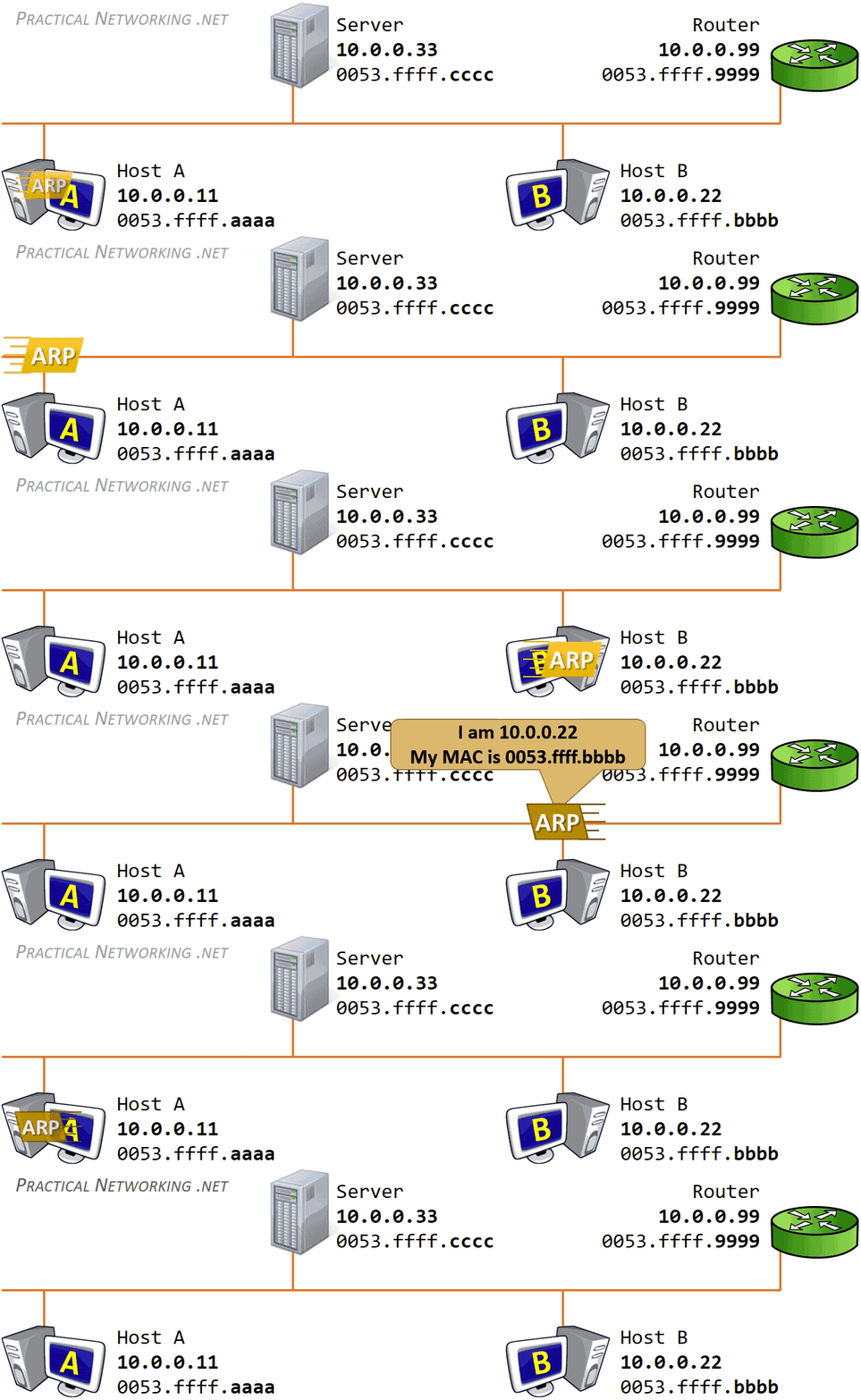
Let’s say your device wants to talk to another device on the same network but doesn’t know its MAC address.
It sends out an ARP Request to everyone on the network: “Hey, who has IP 192.168.1.5?”
The device with that IP replies: “That’s me! Here’s my MAC address.”
Your device stores this info for future use — this is called ARP caching.
Next time, it won’t ask again — it already knows!
Simple, right? No need to ask every time!
🧩 IP Subnetting – Breaking Big Networks into Small Pieces
Subnetting is like dividing a big group into smaller teams. It helps keep networks efficient and organized.
IP addresses have 4 sections (called octets). Example:
192.168.1.0Subnetting defines how many devices can fit in one group and who belongs where.
Let’s break down how an IP address is used:
| Type | Purpose | Example |
| Network Address | Identifies the start of the network | 192.168.1.0 |
| Host Address | Identifies each device on the network | 192.168.1.100 |
| Default Gateway | The device (usually a router) that connects networks | 192.168.1.254 |
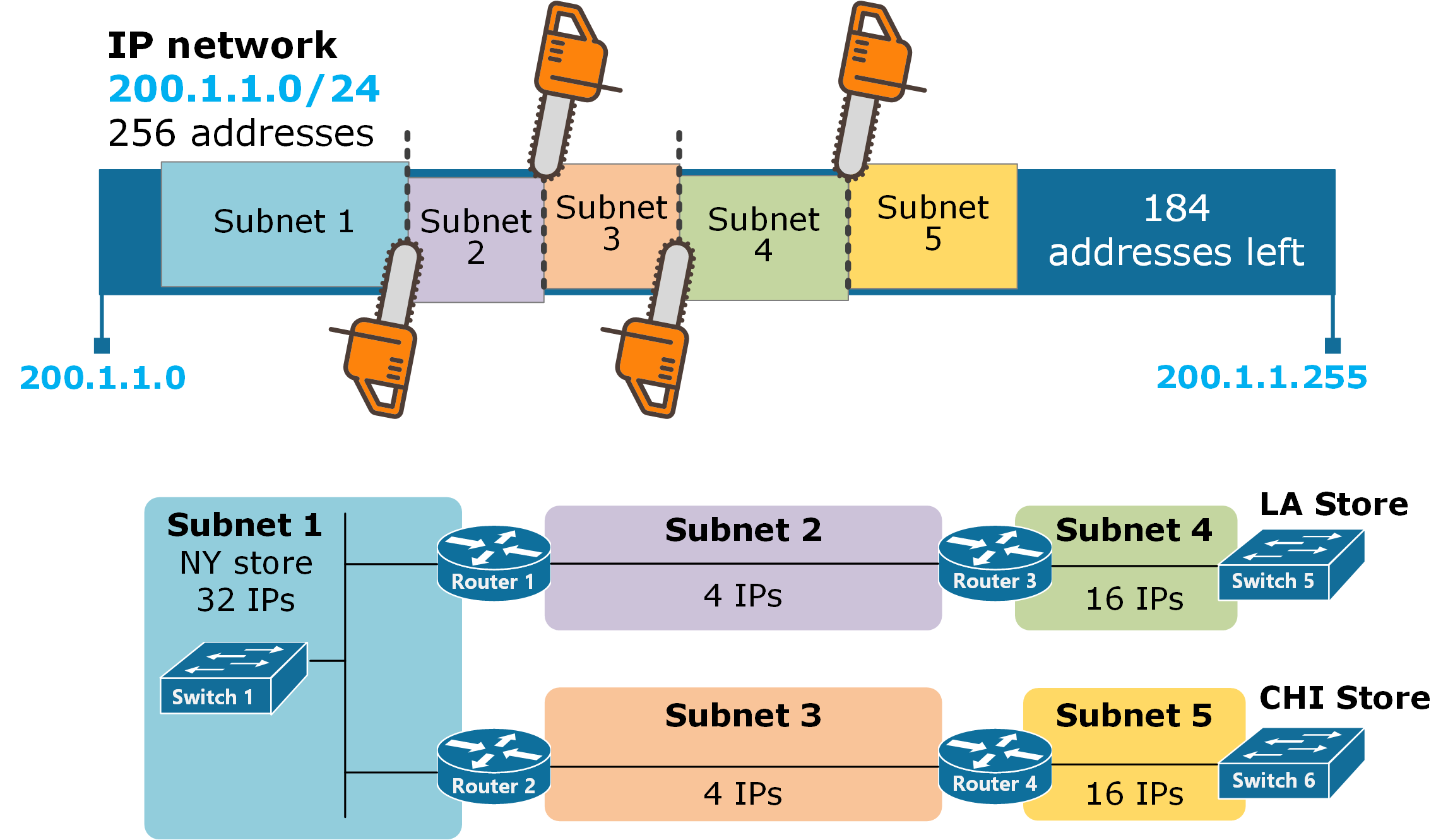
Subnetting helps route traffic efficiently and keeps everything neat and organized.
🌐 NAT (Network Address Translation) – Sharing One IP Like a Pro
Ever wondered how so many devices at home share one internet connection? That’s NAT doing its magic.
🔁 What is NAT?
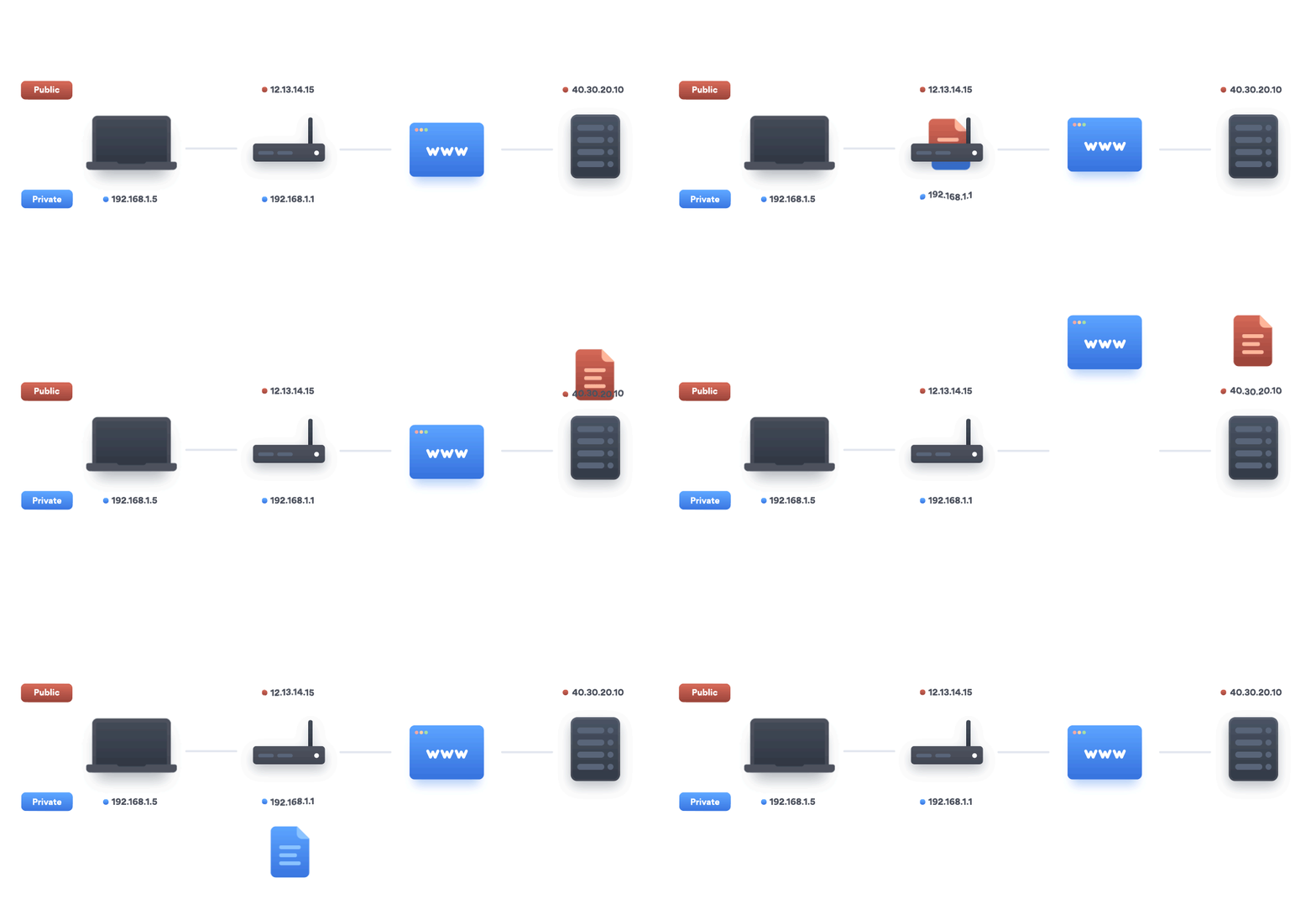
NAT converts private IPs (used in homes/offices) into public IPs (used on the internet). It lets multiple devices use one public IP address.

✨ Types of NAT:
1. PAT (Port Address Translation)
Every device gets a different port.
Great for home networks with lots of devices.
Example: Laptop, phone, TV — all online using the same public IP.
2. DNAT (Destination NAT)
Used to send traffic coming into your network to a specific device.
Example: Hosting a website on your PC? DNAT helps users reach it.
3. SNAT (Source NAT)
Used when going out to the internet.
It changes the source IP to your public IP so websites know who’s contacting them.
✅ Real-Life Use Cases:
Home Wi-Fi: One IP, multiple devices.
Web hosting: Let users outside access your internal server.
VPNs: Securely access your home network from anywhere.
🖥️ Assigning IPv4 Addresses to Routers and Hosts
Giving devices IP addresses is like giving them a phone number — they can’t communicate without it.
🛠️ Assigning IP to Routers (Cisco-style steps):
Check available interfaces:
show ip interface briefGo into config mode:
configure terminalSelect interface:
interface fa0/0Assign IP and subnet:
ip address 192.168.1.1 255.255.255.0Enable it:
no shutdownVerify:
show ip interface briefagain
🖥️ Assigning IP to Hosts (like your PC or printer):
Use Static IP for important devices:
IP:
192.168.1.10Subnet:
255.255.255.0Gateway:
192.168.1.1
Use DHCP for everything else (auto-assigns IPs).
- Example range:
192.168.1.2 – 192.168.1.100
- Example range:
After assigning, use ping to test if devices are talking to each other!
🚀 Wrapping Up Day 3
Today, we covered some of the most essential building blocks of networking. You now understand:
How ARP helps devices find each other.
Why subnetting keeps networks clean and efficient.
How NAT allows multiple devices to use one public IP.
How to assign IP addresses to routers and hosts properly.
Up next in this journey: DHCP, DNS, and IP Conflicts – stay tuned!
💬 Liked this breakdown? Drop a comment or question – let’s learn together!
🔗 Follow the series: Network+ made easy, one day at a time.


